NEW EMOJI PANEL
Minuum provides exciting new ways to enjoy your screen space through the “always-open” emoji panel option. This lets you effortlessly add fun and playful emoticons to all your messages—including Snapchat.
MULTI-LANGUAGE CAPABILITY
Download different language modules and switch between them. We’d love to hear your feedback on the quality of our dictionaries as we beta test new languages. We currently support:
• English
• Spanish (beta)
• French (beta)
• German (beta)
• Italian (beta)
HOW MINUUM WORKS
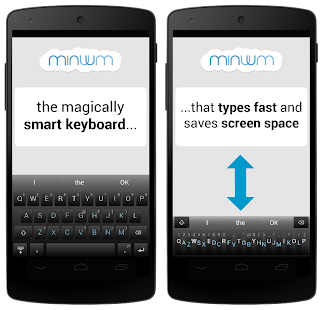
Minuum re-imagines the keyboard by reducing a standard layout to a single line—a continuum of letters—letting you type quickly and accurately without needing large keys. We enable this by auto-correction algorithms that allow highly imprecise typing, knowing what you mean even if you miss every single letter.
SMART WATCH SUPPORT
Minuum is the ideal keyboard for the small screens of smart watches. To get Minuum for smart watches, simply e-mail: developers@minuum.com
DISCOVER MORE
The Minuum keyboard for touchscreens is the first step toward a "type anywhere" future. Smart watches are just the beginning. Soon Minuum will let you type in ways you never imagined. For more information: http://www.minuum.com
FEATURES AT A GLANCE
♦ MORE SCREEN SPACE
Recover more than half of the touchscreen space you lose when using traditional virtual keyboards.
♦ FAST SLOPPY TYPING
Type fast without worrying about precision, thanks to ridiculously smart auto-correction that learns as you type.
♦ HELP FOR THE LARGE-FINGERED
Use key magnification for precise letter, number, and punctuation entry—very useful if you have large fingers.
♦ FAMILIAR KEYBOARD LAYOUT
You already know how to type with Minuum—it’s just your familiar layout, minimized.
♦ DIFFERENT ALPHABET ARRANGEMENTS
Choose from alternate keyboard layouts—such as “QWERTZ,” “AZERTY,” “A-Z.”
♦ EXPANSION TO FULL-SIZED KEYBOARD
Press with two fingers on the keyboard to quickly switch between mini and full-size modes (useful for URLs and passwords).
♦ SMART WORD PREDICTION
Speed up your typing via suggestions from a predictive engine that learns from your word list, word combinations, and language use patterns.
♦ VOCABULARY CONTROL
Minuum learns from your vocabulary, and lets you delete words from your dictionary though a pop-up display.
♦ RAPID GESTURE SHORTCUTS
Slide your fingers to the corners for quick, convenient access to all your features via pop-up keys.
♦ VOICE TYPING
Enter text hands-free via Google Voice Typing for voice-to-text typing when performing other activities.
No comments:
Post a Comment